
Why the laser has no laser beam?
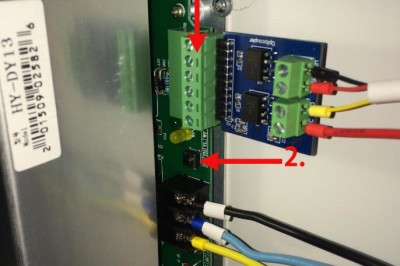
Following reasons cause the failure of laser working (has no laser beam) 1. Cooling system problem (includes water chiller) 2. Laser power supply (optical coupled isolator) or Laser tube 3. Wiring or Controller 1. If there shows “water protection errors, work pauses” on the control panel. 1) Pease check interfaces of water flow(ALARM OUTLET), see […]
Why the Y axis cannot work suddenly?
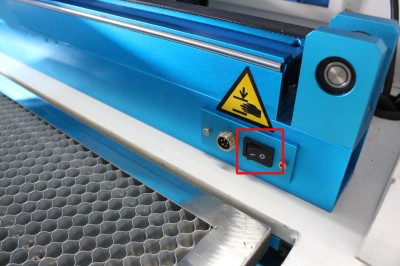
1. Please check if the rotary switch is turned on,like below: PS: Turning to “O” off means all is normal. If it is “-“, please turn off to “O” and press the reset on control panel. 2. if the rotary axis switch is off and the problem still exist, please check the Y axis driver, […]
Why does the cutting and engraving graphics reverse (mirror)
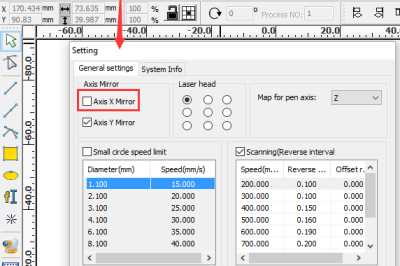
This problem may cause from improper setting of the software. Please start up the laser software RDWorksV8. And then click “Config” – “system setting” on the menu bar. This dialog box appears. Make sure “Axis X mirror” is unticked, and “Axis Y Mirror” is must ticked. If your setting is different from this, this is […]
Why does the graphic size that imported to RDWorks different from its original size
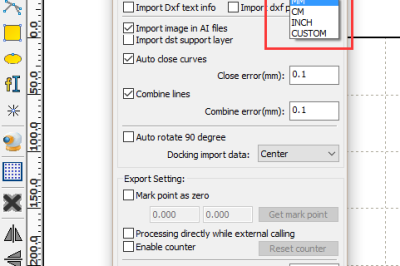
If the file being imported is DXF format, the problem may be caused by improper software setting. For example, the unit of the original DXF file is “inch”, but in RDWorks, the DXF unit is set as “mm”. When you import the DXF graphic to RDWorks, the graphic will be read as “mm” unit. Therefore […]
How to run several laser machines with one PC
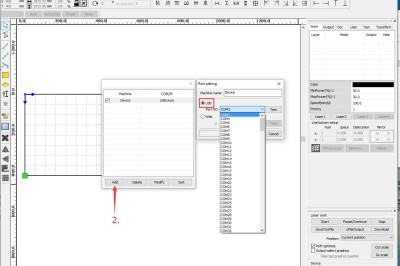
If there are several USB interfaces with your PC, it’s able for one PC (laser software) to connect with several machines. But pc will does only communicate with one machine and sending the file into the laser in the same time For USB connection as below 1. When connecting with the first machine, it’s connected […]
How to install the CorelDraw plugin for RDWorks
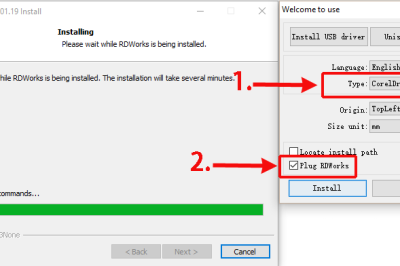
1. Firstly run CorelDraw and set the parameter following below instructions: 2. After that, close CorelDraw. Double click to open RDWorks installation program. Choose the type of CorelDraw_Laser (be sure the RDWorks main program has been already installed), and then tick the item RDworks, as shown below: Click “install” and wait to compete the installation. […]
How to import PDF files into RDWorks
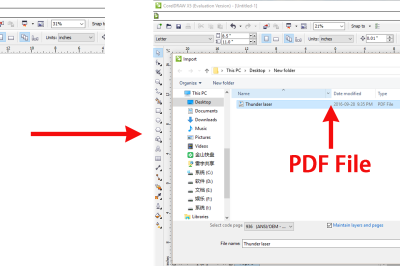
1. RDWorks cannot read PDF and open it directly. 2. Use CorelDraw to open/import PDF file. Then save the graphic as DXF file. Like below: 3. Then RDWorks can read the DXF file, Just import the DXF file into RDWorks directly. 4. The other way is open/import PDF file with CorelDraw,use the plugin button “Laser […]
Big news: Thunder Laser finally won the trademark infringement lawsuit in Germany
Big news: Thunder Laser finally won the trademark infringement lawsuit in Germany. In 2011, with preferential prices and excellent quality, Thunder Laser entered in German market and has many customers and good reputation there after successfully establishing the brand identity of Thunder Laser. In 2014, in response to the CE requirements of Germany, Thunder Laser […]
Ricardo’s visit trip to Thunder Laser China
September 13, 2016, Ricardo from Thunder Laser Brazil came to visit and discuss about how to explore profession applicative technology, develop high-end laser market in Brazil and other topics. Meanwhile, having experience in Brazilian exhibition for two consecutive years, Thunder Laser is cooperating with Ricardo again for the preparation of Brazilian exhibition in 2017. Ricardo […]
Laser Engraving wood aztec calendar
THUNDERLASER laser engraving machine engraving Aziz Turk solar calendar Popular Pages Click to visit Click to visit Click to visit