
Stamp-photo
Sample photo ALL Wood Acrylic Paper Glass Fabric And Leather Anodized Aluminum Bamboo Ceramic Coated Metal Foam Double Color Abs Granite And Marble Grip Tape Plastic Rostone Rubber Cylindrical Objects Iphone & Mobile Phone High Resolution Metal Engraving 3d Engraving Model Cutting Photo Engraving Signage Silicon Stamp Other Stamp 01 Click for larger image Stamp […]
Silicon-photo
Sample photo ALL Wood Acrylic Paper Glass Fabric And Leather Anodized Aluminum Bamboo Ceramic Coated Metal Foam Double Color Abs Granite And Marble Grip Tape Plastic Rostone Rubber Cylindrical Objects Iphone & Mobile Phone High Resolution Metal Engraving 3d Engraving Model Cutting Photo Engraving Signage Silicon Stamp Other Silicon 01 Click for larger image Silicon […]
Laser cutter’s LCD panel in Chinese
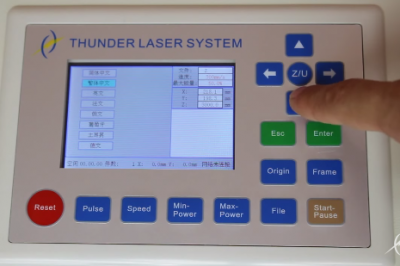
If your laser cutter’s LCD panel is in Chinese,it might cost you lots of time to set to English.Now Thunder laser will show you how to change Chinese to English just in a few seconds. Step 1. click “Z/U” button Step 2. select “语言设置”and then press “Enter” to confirm Step 3. select “英文”and press “Enter” […]
My door is too narrow (only 80CM wide), how to move the laser cutter into my house?
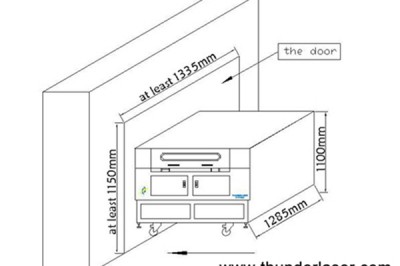
As long as your door is wider than 740mm, you can divide your thunder laser cutter into two parts and pass your door without problem. Please remove the screws at the four corners of your laser cutter as below: Then you can divide the top part from the foot of the machine. Please pay attention […]
Signage-photo
Sample photo ALL Wood Acrylic Paper Glass Fabric And Leather Anodized Aluminum Bamboo Ceramic Coated Metal Foam Double Color Abs Granite And Marble Grip Tape Plastic Rostone Rubber Cylindrical Objects Iphone & Mobile Phone High Resolution Metal Engraving 3d Engraving Model Cutting Photo Engraving Signage Silicon Stamp Other Signage 01 Click for larger image Signage […]
The computer can’t identify the laser cutting machine
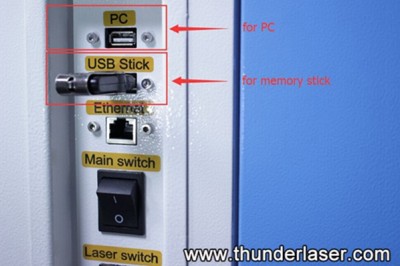
If the software shows the below information: Please try the following solutions: A.Please check if the USB cable is loose or not. B.Please check if the USB is connected to the PC interface on the machine correctly C.Try connect to another USB interface on the computer D.Change another USB cable E.If you use a laptop […]
Laser cutter has a wrong cutting/engraving size
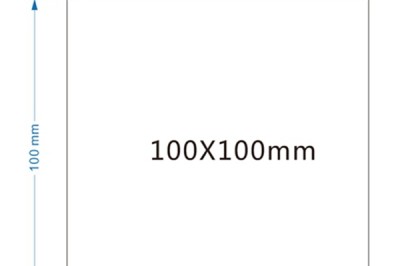
If this problem occurs, generally the pulse setting of the X/Y axis motors is wrong. Please follow the below steps to solve the problem Please draw a 100x100mm square using the cut mode and send to your laser cutter and cut the square. Let’s say the actual size of the square measured is 98x95mm How […]
Photo-Engraving-photo
Sample photo ALL Wood Acrylic Paper Glass Fabric And Leather Anodized Aluminum Bamboo Ceramic Coated Metal Foam Double Color Abs Granite And Marble Grip Tape Plastic Rostone Rubber Cylindrical Objects Iphone & Mobile Phone High Resolution Metal Engraving 3d Engraving Model Cutting Photo Engraving Signage Silicon Stamp Other photo-Engraving 01 Click for larger image photo-Engraving […]
Why the starting point of a cutting graphic can’t meet with its end point
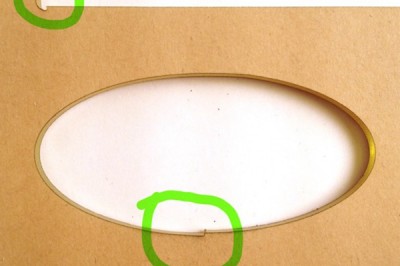
The problem is generally caused by two reason: 1. Belts of X axis and Y axis is loose: ① please check if X axis is loose ② please check if belt of Y axis is loose like below: 2. Caused by guiding rail of X axis not perpendicular with guide rails of Y axis Please […]
Model-Cutting-photo
Sample photo ALL Wood Acrylic Paper Glass Fabric And Leather Anodized Aluminum Bamboo Ceramic Coated Metal Foam Double Color Abs Granite And Marble Grip Tape Plastic Rostone Rubber Cylindrical Objects Iphone & Mobile Phone High Resolution Metal Engraving 3d Engraving Model Cutting Photo Engraving Signage Silicon Stamp Other Model-Cutting 01 Click for larger image Model-Cutting […]